Bridge#
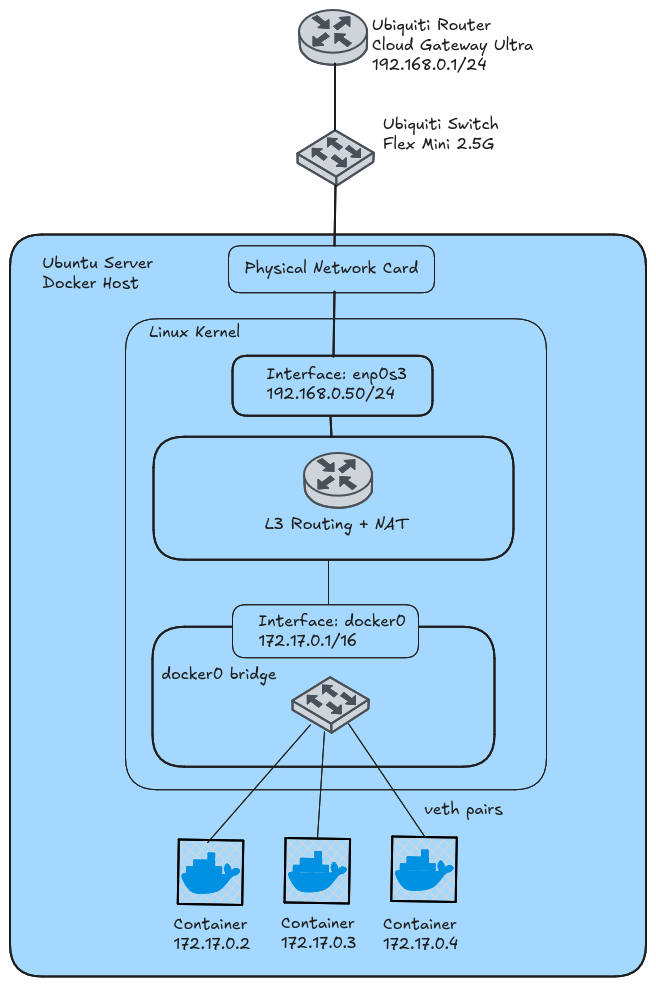
Bridge is Docker’s default network driver. Docker creates a virtual switch on the host and places containers on a private subnet behind it. The host NATs container traffic out through its own IP. Containers can reach the outside world on their own. Inbound access requires a published port.
Components#
docker0#
By default, Docker creates a Linux bridge named docker0.
- It is a software Layer 2 switch. It connects containers and forwards Ethernet frames between them.
- It is also a network interface on the host. docker0 holds the address 172.17.0.1/16 and serves as the default gateway for containers. The kernel treats it like any other interface, such as enp0s3.
This is possible because docker0 is a software object in RAM that stores the interface’s configuration properties, like its IP address, MAC address, and link status, alongside pointers to the kernel functions that process its traffic.
veth pairs#
Each container connects to the bridge through a veth pair. A veth pair acts as a virtual patch cable with an interface on each end.
- One end sits inside the container and appears as eth0.
- The other end attaches to docker0 as a switch port.
The kernel as router#
The host kernel handles routing with three features.
- IP forwarding lets it move packets between interfaces.
- The routing table picks the exit interface.
- iptables rules handle NAT.
Traffic flows#
Container to container#
Two containers on the same bridge share a subnet. Traffic between them stays at Layer 2. The bridge forwards the frame from one veth port to the other.
Container to the internet#
- The container sends a packet to an address outside 172.17.0.0/16. It uses 172.17.0.1 as the gateway, so the frame is addressed to docker0’s MAC.
- The bridge sees a frame for its own MAC and passes the packet up to the kernel’s routing code.
- The routing table selects the outbound interface, such as enp0s3.
- The MASQUERADE rule rewrites the source address from the container’s IP to the host’s IP. Connection tracking records the mapping.
- The packet leaves the host.
Return traffic#
- The reply arrives at the host’s IP.
- Connection tracking matches it to the original flow and rewrites the destination back to the container’s IP, for example 172.17.0.3.
- The routing table shows 172.17.0.0/16 is reachable through docker0. The kernel hands the packet to the bridge.
- The bridge looks up the container’s MAC and delivers the frame out the correct veth port.
Published ports#
Devices on your home network have no route to 172.17.0.0/16. Docker’s iptables rules also drop direct traffic to container addresses. Publishing a port opens a path in.
The format is host_port:container_port.
docker run -d -p 8080:80 nginxThis creates a DNAT rule. Traffic arriving at the host on port 8080 is rewritten to the container’s IP on port 80. From there it follows the same path as return traffic. If the Docker host is 192.168.0.50, any device on your home network can reach nginx at http://192.168.0.50:8080.
Things to Know#
Broadcast and multicast: Bridge networks put containers on their own subnet, with the Docker host routing between it and your LAN. Broadcast and multicast don’t cross routers, so containers never see discovery traffic from devices like smart bulbs or printers on your LAN. If your app relies on discovery, like Home Assistant, Plex, mDNS/Avahi, or a DHCP server, use the host driver instead.