Host#
With the host driver, Docker doesn’t create a separate network namespace for the container. The container uses the host’s namespace instead. It shares the host’s network card, MAC address, and IP address. On the network, it looks exactly like the server itself.
Components#
Linux namespaces#
Linux namespaces isolate operating system resources. It’s very similar to virtualization.
As a quick recap, a hypervisor (Hyper-V, ESXi, Proxmox) virtualizes the hardware (CPU, RAM, and NICs) so multiple VMs can share a single physical server, with the support of hardware extensions like Intel VT-x or AMD-V. Essentially, a hypervisor presents virtual hardware to each VM, allowing each one to operate as though it has its own dedicated hardware.
A namespace is one level higher. Instead of isolating hardware resources, it isolates operating system resources like the filesystem, network, and process list.
Traffic Flows#
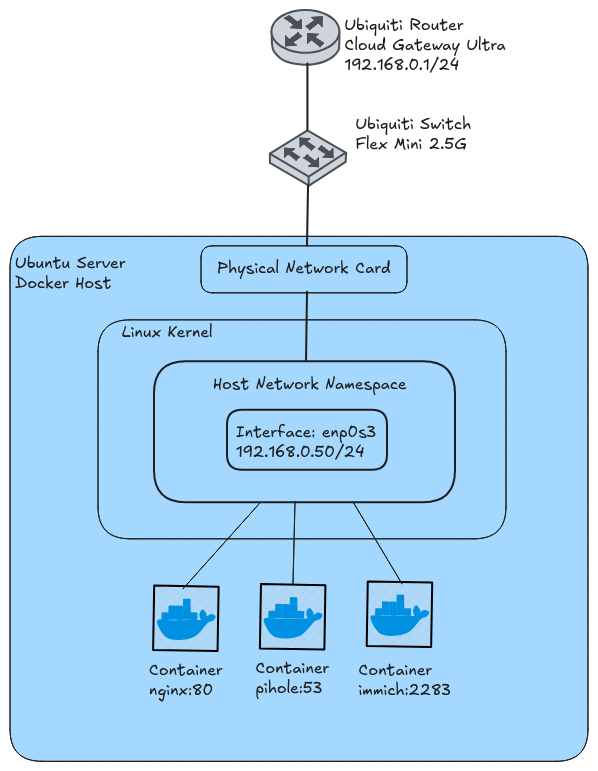
The Ubuntu server has a default network namespace. This is where the host’s normal network configuration lives, including its physical network card, IP address, routing table, and firewall rules. Containers share this namespace. So for example, if you run nginx on port 80, you access it on 192.168.0.50:80.
Things to Know#
Port conflicts: Host-mode containers share the host’s network namespace, so they can’t listen on the same port. For example, you can’t run two containers that both listen on port 80.
Broadcast and multicast: Host mode puts the container directly on your LAN, the same network as the rest of your devices. It can hear broadcast and multicast traffic from things like smart bulbs, printers, and streaming devices. Use this for apps that rely on discovery, like Home Assistant, Plex, mDNS/Avahi, and DHCP servers.